![logo2.png]](https://help.brandwizard.io/hs-fs/hubfs/logo2.png?height=40&name=logo2.png)
In this article, you will get acquainted with the following information:
- How to set a period for displaying charts and comparing data?
- What statistics are presented on the page?
- Average response time
- Response time by employee
- Average response time by platform
- How to download a report in .xlsx and .pdf format?
To navigate to the page, click on Reviews Center in the menu and select Statistics from the dropdown list.
Attention! The data in this section is presented from January 5, 2024.
How to set a period for displaying charts and comparing data?
All analytics on the page is provided based on the period set in the calendar:
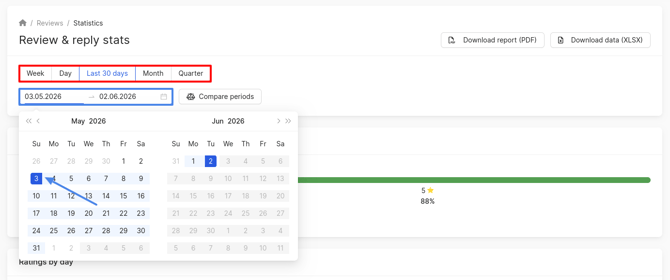
- You can choose standard periods: week, 30 days, month, quarter.
- You can set a custom period by selecting dates in the calendar.
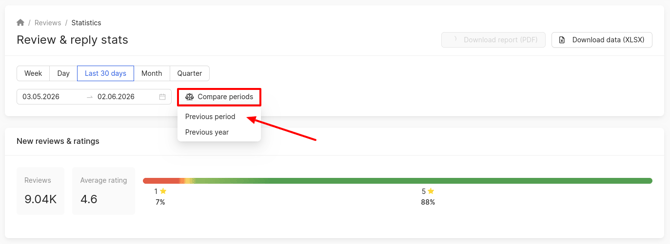
You can also compare periods. To do this, click on the button and select the period: for the previous year/period.
What statistics are presented on the page?
Information is provided in blocks with various indicators on reviews and responses:
- New reviews & ratings - you can find out the number of new reviews and the average rating for the selected period. A rating distribution scale of reviews is also presented, showing the percentage ratio of the total number of reviews.
Attention! Only those reviews whose appearance date in the personal account falls within the specified date range are taken into account. - Ratings by day - learn the distribution of review ratings by days over the selected period, as well as the average rating.
- Reviews by platform - you can find out the distribution of reviews by catalogs and see where they are left more.
- Auto-replies used and AI replies used - the number of responses given to reviews using neural networks and the auto-response service.
- Unanswered reviews - find out the share of reviews that have not yet been responded to. Data is displayed without considering reviews that cannot be answered.
- Complaints sent - find out the number of complaints and auto-complaints sent.
- Auto-complaints - find out the number of auto-complaints created.
- Reviews removed - find out the number of reviews that have been deleted.
- Popular tags - you can find out the popular tags and their count that your employees have added to reviews over the selected period.
In the Reviews by platform block, there can be two sources: Google Business Profile and Google Maps. Such display is not an error and occurs due to the linking of the Google catalog. If none of your companies are verified, reviews will be collected under the Google Maps catalog. After verification, they will be displayed under the Google Business Profile catalog. If you have both types of companies, two catalogs will be shown until the remaining locations are verified. Consequently, you will not be able to respond to reviews from Google Maps.
Average response time
Attention! The average response time is calculated based on the replies given within the selected period.
In this block, you can find out the average response time in the personal account and for the client:
- In the personal account, it is calculated as follows: the sum of response times in the personal account that were sent through the personal account / the number of reviews that were responded to through the personal account.
- For the client, it is calculated using the formula: the sum of response times in the catalog (deleted reviews are not counted) / the number of reviews with a response in the catalog (deleted reviews are not counted).
Response time in the personal account = time of response creation in the personal account - time of review entry into the personal account.
Response time in the catalog = time of response publication in the catalog - time of review publication in the catalog.
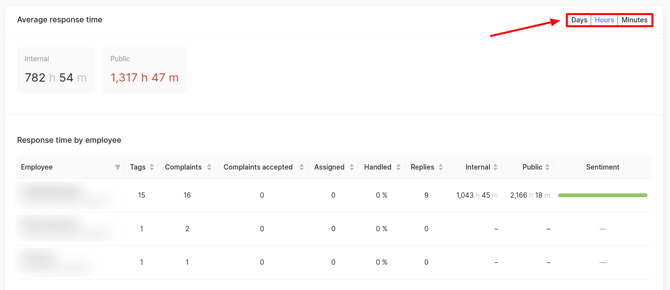
Information can be presented in three forms: days/hours/minutes.
Response time by employee
Attention! The average response time is calculated based on the replies given within the selected period.
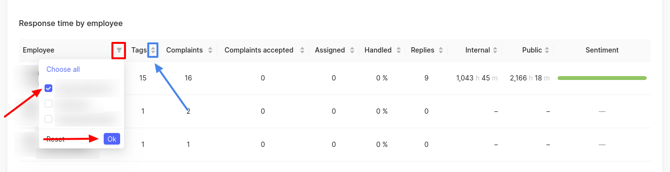
In this block, you can find out the average response time of your employees in the personal account and for the client:
- In the personal account - this is the sum of response times in the personal account that were sent by the employee in the personal account / the number of all reviews that were responded to through the personal account by this employee.
- For the client - this is the sum of response times in the catalog that were sent from the personal account by the employee / the number of these reviews.
Response time in the personal account = time of response creation in the personal account - time of review entry into the personal account.
Response time in the catalog = time of response publication in the catalog - time of review publication in the catalog.
For each employee, the following information will also be displayed:
- Tags – the total number of tags the employee added to reviews during the selected period.
- Complaints – the total number of complaints the employee submitted about reviews during the selected period.
- Complaints accepted – the total number of complaints from the employee that were accepted by the catalogs during the selected period.
- Assigned – the total number of reviews assigned to this employee for processing during the selected period.
- Handled – the total number of reviews the employee processed (status Processed on the review) during the selected period.
- Replies – the number of responses the employee left via the personal account during the selected period.
-
Sentiment— a scale showing the proportion of negative, positive, and neutral reviews processed by this employee.
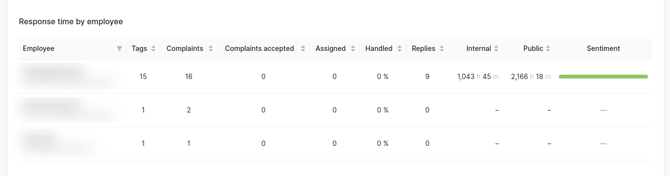
The table can be sorted by employee. To do this, click on the filter icon, select the desired employee, and click OK. The columns in the table can be filtered in ascending/descending order.
Average response time by platform
Attention! The average response time is calculated based on the replies given within the selected period.
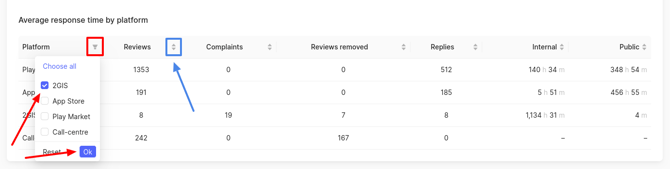
In this block, you can find out the average response time for each category, as well as the number of sent reviews, complaints, deleted reviews, and responses.
- In the personal account - this is the sum of response times in the personal account that were sent through the personal account for the category / the number of reviews that were responded to through the personal account for the category.
- For the client - this is the sum of response times in the catalog (deleted reviews are not counted) / the number of these reviews.
Response time in the personal account = time of response creation in the personal account - time of review entry into the personal account.
Response time in the catalog = time of response publication in the catalog - time of review publication in the catalog.
Please note!
- The Reviews column displays the count of reviews received during the selected period. Deleted reviews are not included.
Attention! Only those reviews whose appearance date in the personal account falls within the specified date range are taken into account. - The Replies column shows the number of replies given through the personal account during the selected period.
For example, if a review was left on 15.05.25 and an employee replied to it on 06.07.25, and the page's selected period is from 01.06.25 to 07.05.25, the review itself will not be counted in the table, but the response will be.
- The Complaints column displays the number of complaints left during the selected period. Data on manual complaints and automatic complaints are taken into account.
- The Reviews removed column shows the number of reviews deleted during the selected period.
The table can be sorted by employee. To do this, click on the filter icon, select the desired employee, and click OK. The columns in the table can be filtered in ascending/descending order.
How to download a report in .xlsx and .pdf format?
To export statistics on reviews and responses, click on Download report (PDF) and Download data (XLSX). The pdf report will be downloaded immediately.

When downloading the report in xlsx. format, a window will appear, in which, if necessary, to send the report to someone else besides you, you can enter additional email addresses in the Additional emails field, separated by commas. If there is no need for this, leave the field blank. Then click Apply.
The received report includes the following sections: Summary, Employees, Catalogs, Tags, Reviews with Complaints.
In the Summary section, the following data are presented:
- Period — the timeframe for which the report is generated.
- Distribution of reviews by rating.
- Distribution of reviews by sentiment (positive, negative, neutral, not specified).
- Percentage of reviews without a reply.
- Used auto-replies — the number of auto-responses sent to reviews.
- Used AI reply suggestions — the number of responses generated via neural network.
- Reply time in the personal account (in minutes) — the total time spent replying to reviews in the personal account. The time for a single response is calculated using the formula: response creation time in the personal account minus review creation time in the personal account.
- Reply time in the catalog (in minutes) — the total time spent replying to reviews in the catalog. The time for a single response is calculated using the formula: response creation time in the catalog minus review creation time in the catalog.
In the Employees section, the data include:
- Name — employee's name.
- Email — employee's email.
- Answered reviews — number of reviews the employee responded to.
- Reply time in the personal account (in minutes) — the total time spent replying to reviews in the personal account. The time for a single response is calculated using the formula: response creation time in the personal account minus review creation time in the personal account.
- Reply time in the catalog (in minutes) — the total time spent replying to reviews in the catalog. The time for a single response is calculated using the formula: response creation time in the catalog minus review creation time in the catalog.
- Tag count — tags added by the employee to reviews.
- Assigned reviews — number of reviews assigned to the employee.
- Processed reviews ratio — the percentage of reviews that this employee has responded to.
- Abuses — number of complaints submitted by the employee.
- Accepted abuses — number of complaints accepted by the catalog from the employee.
In the Catalogs section, the following data are provided:
- Catalog name.
- Reviews — number of reviews collected from the catalog.
- Abuses — number of complaints filed about reviews in the catalog.
- Deleted reviews — number of reviews removed from the catalog.
- Answered reviews — number of reviews responded to in the catalog.
- Reply time in the personal account (in minutes) — the total time spent replying to reviews in the personal account. The time for a single response is calculated using the formula: response creation time in the personal account minus review creation time in the personal account.
- Reply time in the catalog (in minutes) — the total time spent replying to reviews in the catalog. The time for a single response is calculated using the formula: response creation time in the catalog minus review creation time in the catalog.
In the Tags section, the data include:
- Tag name.
- Reviews count — how many reviews the tag has been added to.
In the Reviews with abuses section, the data comprise:
- Review — text of the review.
- Review date — date the review was posted in the catalog.
- Abuse date — date the complaint was submitted in the personal account.
- Type of complaint:
- Auto — a system-generated complaint sent via neural network.
- Manual — a complaint sent manually.
- Abuse status:
- Accepted — the complaint was accepted by the catalog.
- Rejected — the complaint was rejected.
- Error — an error occurred during complaint submission.
- Review not found — the review associated with the complaint could not be found in the catalog.
- Sent — the complaint has been sent and is under review by the catalog.
You can find out about the Reviews Analysis page further.