![logo2.png]](https://help.brandwizard.io/hs-fs/hubfs/logo2.png?height=40&name=logo2.png)
In this article, you will get acquainted with the following information:
Each operator in Multichat can create their own signature. A personal signature can be added at the end or in the footer of your messages. In Multichat, you can use your signature across all channels and are not limited to email only.
How to create a personal signature?
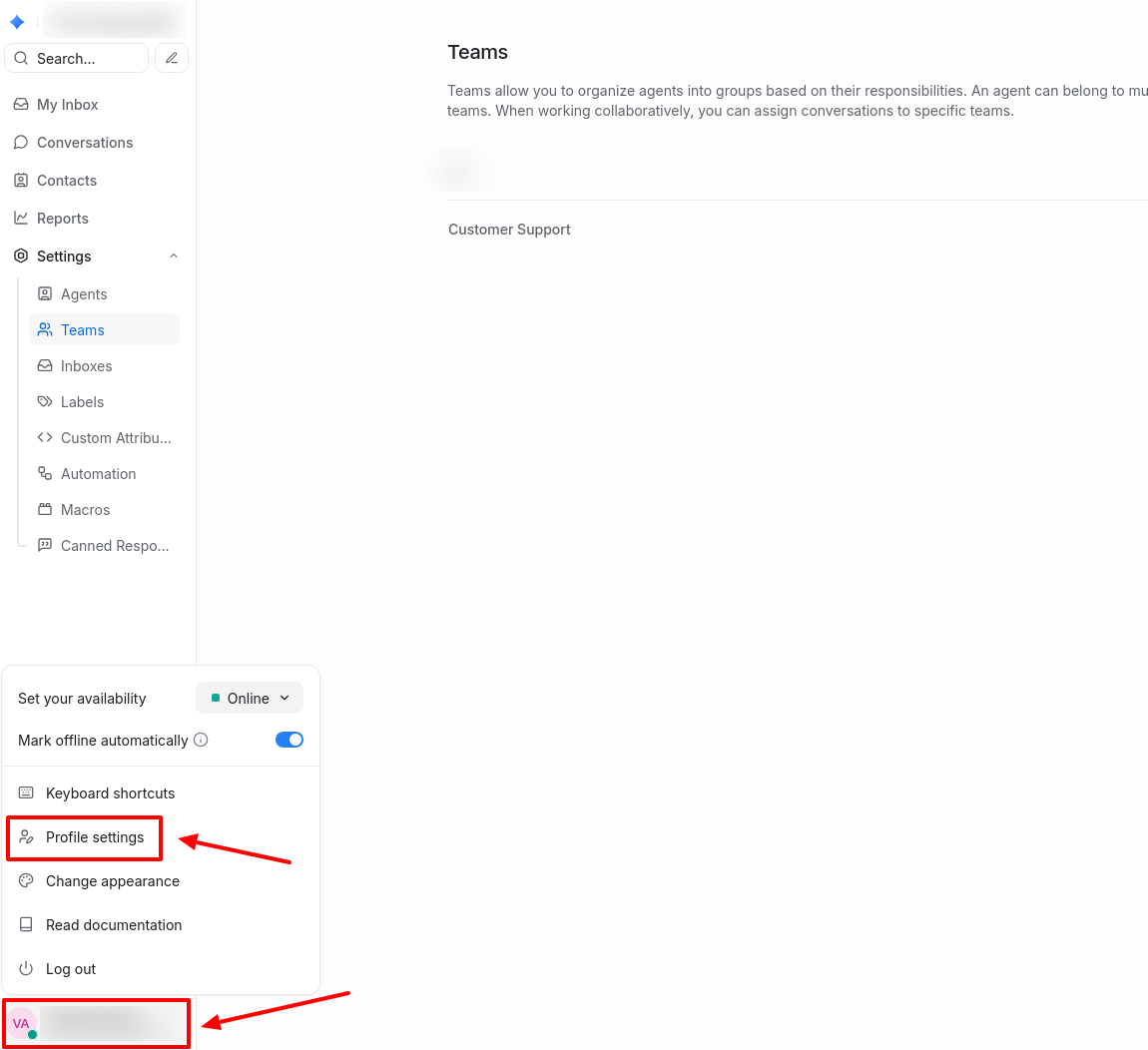
Click on your profile in the lower left corner of the sidebar and select Profile Settings.
Scroll down the page to the second section called Personal Message Signature. Add your signature in the text box. Use various formatting options, emojis (which can be copied from any messenger), and upload images to customize your signature.
Click Save Message Signature.
Attention! The signature format may vary in different sources due to API restrictions. Images within the text will only be visible in emails, website chats, and API channels that support both text and images. In other channels, only the textual components of the signature will be displayed.
How to use a signature in messages?
To add a signature to a dialogue, enter your message and click on the Signature icon. If necessary, you can edit the signature before sending.
After sending, the signature will automatically appear in the message input window for that dialogue. To remove it from that particular dialogue, click the Signature icon again.