![logo2.png]](https://help.brandwizard.io/hs-fs/hubfs/logo2.png?height=40&name=logo2.png)
In this article, you will learn the following information:
This report is ideal for evaluating team performance as well as identifying trends and areas that require improvement in the responses of each team member.
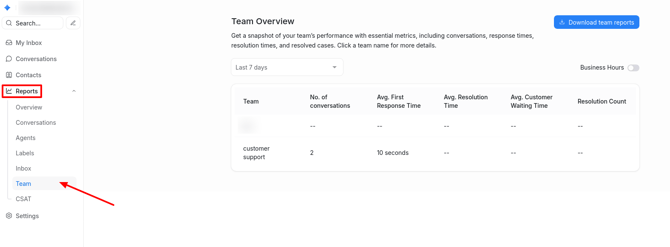
To access the report, go to Reports → Team.
How to filter the report?
The data on the page is displayed depending on the selected period:
- Last 7 days.
- Last 30 days.
- Last 3 months.
- Last 6 months.
- Last year.
- Custom date range.
When selecting the Custom date range period, a calendar will appear where you can choose the required dates.
Enable the toggle in the upper-right corner of the screen to adjust report metrics for working hours.
If the Business Hours option is enabled for a channel, the report data will be calculated based on working hours. You can set working hours in the channel settings by going to Settings → Inboxes, then clicking the edit button (pencil icon) for the selected channel.
How to download the report in .csv format?
To export team data, click Download team reports.