![logo2.png]](https://help.brandwizard.io/hs-fs/hubfs/logo2.png?height=40&name=logo2.png)
In this article, you will learn about the following information:
The Overview page displays real-time statistics about what is happening in your account: how many conversations are open, which agents are available, and more.
To access the Overview report, go to Reports → Overview.
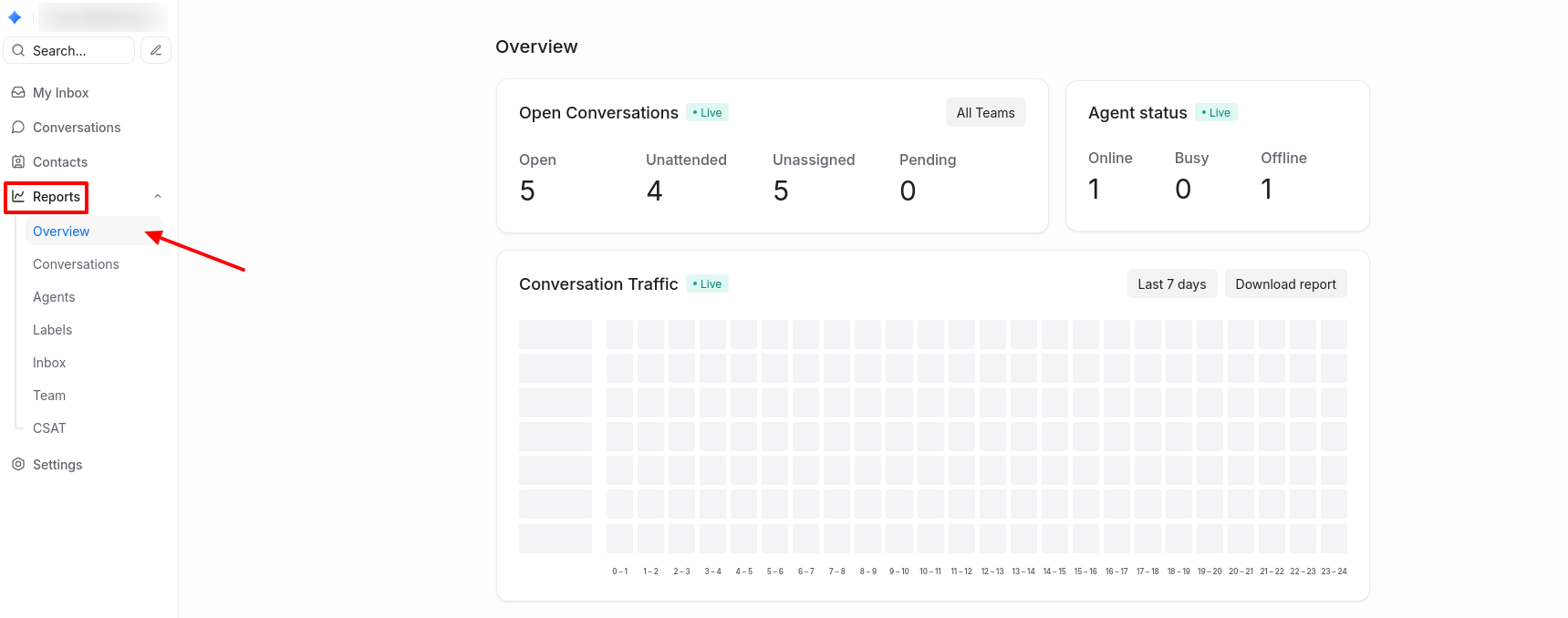
Open Conversations
Displays the number of conversations in your account that are currently in the following statuses:
- Open: ongoing interactions with clients.
- Unanswered: conversations requiring attention.
- Unassigned: conversations waiting to be assigned to an agent.
- Pending: conversations waiting for a response.
Statistics by status can be filtered by agent team.
Agent status
Shows the availability status of agents:
- Online.
- Busy.
- Offline.
Conversation Traffic
In the table, shades of blue indicate the times of day when the highest number of messages were received (the darker the shade, the more messages). By hovering over a cell, you can see the number of messages received during that hour of the day. Statistics are available for two selectable periods: the last 7 or 30 days. You can also download a CSV report on message traffic.
Conversations by agents
Displays the number of conversations currently being handled by each agent. This helps you monitor their workload and efficiency.
Conversations by teams
Displays the number of conversations currently being handled by each agent team. This helps you track team workload and performance.