![logo2.png]](https://help.brandwizard.io/hs-fs/hubfs/logo2.png?height=40&name=logo2.png)
In this article, you will learn the following information:
How to filter conversations?
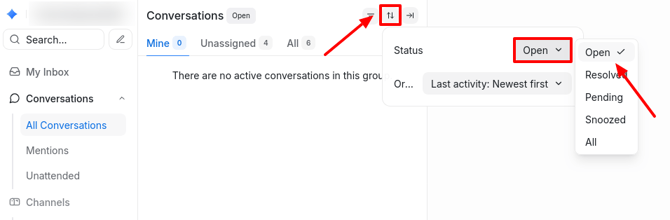
You can sort the conversation list using the grouping button. After clicking it, the following fields will appear:
-
Status. Click on the field and select the desired conversation status.
-
In the next field, you can choose to sort conversations in ascending or descending order based on one of the provided criteria. Click on the field and select the needed value:
- Last activity: oldest first.
- Last activity: newest first.
- Created: newest first.
- Created: oldest first.
- Priority: highest first.
- Priority: lowest first.
- Pending response: longest first.
- Pending response: shortest first.
You can also filter conversations by specific values. To do this, follow these steps:
- Click the Filter button.
- Choose a filter from the dropdown menu (e.g., name or email) and define the condition as Equal to or Not equal to.
- Enter the required value and click Apply Filters.
If needed, add more filters using AND/OR operators.
- The AND operator indicates that both conditions must be met for the conversation to appear. For example, if you select Name in one filter and Email in another, only contacts matching both criteria (name and email) will be displayed.
- The OR operator indicates that at least one condition must be met. For example, if you select City in one filter and Country name in another, contacts matching at least one of these criteria will be shown (either city or country).
How to save a filter?
After applying filters, the Save Filter option will appear. Saving a filter allows you to quickly access the sorted list of conversations.
To do this, click the Save Filter button.
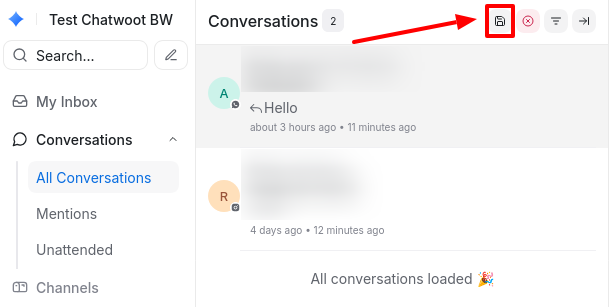
Name the filter and confirm by clicking Save Filter.
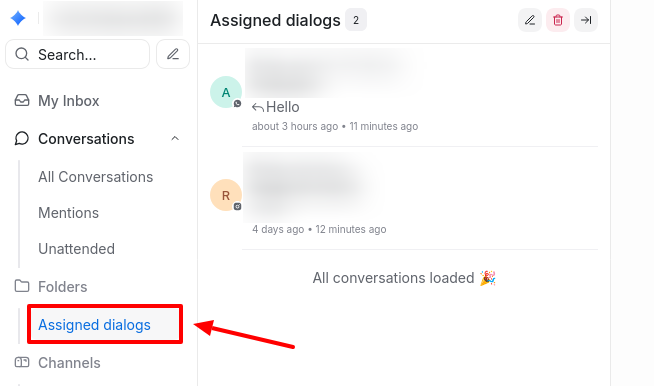
Later, to access the sorted list of conversations based on this filter, select it from the sidebar menu.